
#38 | ChatGPT, write like me! Who’s me?
TL;DR: Step-by-step guide to setting up Custom Instructions, Projects, and Memory in ChatGPT to match your (professional) voice across various content formats.
👋 Hi,
My friend Bruno creates content for three different clients every week.
Monday: LinkedIn post for a tech startup. Wednesday: white paper for a consulting firm. Thursday: newsletter for a nonprofit. So far, so good.
But one thing was driving him crazy…
Each piece came back technically correct but lacking the nuanced voice his solopreneur brand needed.
He’d already figured out ChatGPT’s basic style options—setting it to “professional” for proposals, “conversational” for social posts, and “authoritative” for white papers.
Those defaults got him halfway there (well, better than nowhere, but still sucks is bad, right?).
However, his startup client needed energetic authority, not generic professionalism, and the consulting white paper required diplomatic expertise, not standard academic tone.
On the other hand, his nonprofit newsletter called for warm strategic insight, not basic conversational style.
“I can get ChatGPT in the right ballpark,” he told me over coffee last week. “But I haven’t cracked how to make it sound specifically like me for each context.”
For context, he knows the basics and understands the options. But despite his frustration, it seems he’s just longing for the next level—the setup that turns decent AI output into authentically him.
Turns out, that advanced layer is exactly what Custom Instructions, Projects, and Memory are designed to handle.
What we will cover today:
- How to analyze your writing voice and convert it to ChatGPT instructions
- Where to configure Custom Instructions for consistent voice (free plan)
- How to use Projects and Memory for advanced voice control (Plus plan)
- Format-specific voice adaptations that maintain your professional identity
- When voice setup fails and what to do instead (because it will fail sometimes)
This is a looooong guide, grab a coffee.
The AI Learning Guy newsletter 🤖 🧠💡
AI learning hacks and mega prompts delivered to your inbox.
1. Why ChatGPT sounds random (and how to fix it)
Before we get into setup, let’s acknowledge what’s happening under the hood.
User frustration tells the story: “Custom instructions are now basically ignored. I had a specific way I wanted responses to be structured, and now ChatGPT just does whatever it wants.”
Research backs this up. AI “starts to drift away from stuff said earlier in conversations” and “fails to follow rules in prompts” as interactions continue. (Shocking, I know.)
Here’s why: ChatGPT learned from millions of writing samples—academic papers, marketing copy, technical documentation, casual blogs. Without specific guidance, it randomly samples from this massive style library.
Your LinkedIn post prompt might trigger “thought leadership” patterns while your client email activates “customer service” language. Same AI, but with a different personality each time. (Like having multiple personalities, but less interesting.)
Business impact? Inconsistent voice erodes trust. When your content sounds like different people wrote it, clients notice. (And they remember.)
The solution requires about two hours of initial setup and some monthly maintenance. Once configured properly, every piece sounds authentically like your professional voice. (Well, most of the time.)
2. Free plan strategy: Voice DNA analysis
Here’s how to train ChatGPT on your writing voice, regardless of the plan.
Key insight: Don’t describe your voice—show ChatGPT examples of it. AI learns like humans do—through examples, not lectures.
Step 1: Collect your voice evidence
Gather 3-5 pieces of your strongest professional writing across different formats:
- LinkedIn posts that generated meaningful engagement
- Client emails that received positive responses
- Reports or proposals that achieved their goals
- Articles or blogs in your professional voice
Target: 1500-2000 total words. Quality matters more than quantity. (Your best work, not your most work—quality over ego.)
Step 2: Get ChatGPT to analyze your patterns
Use this analysis prompt:
Analyze these writing samples to identify my professional voice patterns:'[Paste your writing samples here]'Break down:1. Tone characteristics (formal/casual, direct/diplomatic, confident/humble)2. Sentence structure preferences (length, complexity, rhythm)3. Word choice patterns (technical/accessible, industry-specific/general)4. Structural habits (openings, closings, transitions, paragraph style)5. Perspective approach (first person usage, inclusive language, authority level)Provide specific examples from my writing that demonstrate each pattern.
Critical: Iterate and improve your voice training
Don’t stop at the first analysis. After ChatGPT creates content using your voice profile:
- Collect the best outputs that sound most like you
- Add them to your example collection (the good stuff keeps getting better)
- Re-analyze with updated samples every 2-3 weeks
- Refine your Custom Instructions based on improved examples
This iteration loop is especially valuable if you start with limited examples or feel you “don’t have a distinctive style yet.”
ChatGPT will help you discover and refine your voice over time. (Sometimes AI knows you better than you know yourself. Weird, but useful.)
Advanced: Reference famous writing styles
For interesting results, try mixing established voices:
Write using Malcolm Gladwell's clarity and accessibility combined with Seth Godin's conversational directness and practical insights. Maintain my professional expertise focus while adopting their structural and tonal approaches.
Or for more nuanced combinations:
- “Tim Ferriss’s systematic approach + Maya Angelou’s emotional resonance”
- “Cal Newport’s analytical depth + Ann Handley’s engaging accessibility”
Test combinations to find what resonates with your audience and feels authentic to your expertise.
Some combinations work better than others—trust me, I’ve tried weird ones.
Step 3: Create a comprehensive writing style doc
Beyond Custom Instructions, create detailed style guideline files for Projects. You can use this template below and adjust it to your needs.
Writing Style Guidelines Document (save as PDF/DOCX):
VOICE & TONE GUIDELINES- Professional Authority: Confident without being condescending- Conversational Expertise: Accessible explanations of complex topics- Strategic Optimism: Solutions-focused while acknowledging challengesWRITING STYLE RULES- Sentence Length: 15-25 words average, vary for rhythm- Paragraph Structure: 1-3 sentences maximum for readability- Active Voice: 90% active construction, passive only when appropriate- Technical Terms: Define on first use, avoid unnecessary jargonSTRUCTURAL PATTERNS- Opening: Hook with specific example or surprising insight- Body: Problem → Solution → Implementation steps- Closing: Clear next action or thought-provoking questionCONSTRAINTS (Critical for Consistency)- Never use: "dive deep," "leverage," "utilize" (overused business speak)- Avoid: Starting sentences with "This," "It," "That"- Limit: One rhetorical question per 200 words- Format: Bullet points for lists, not numbered unless sequence matters- Tone shifts: Maintain consistency within each piece, adapt between formats
Why constraints matter:
- Consistency: Prevents ChatGPT from falling into generic patterns
- Brand protection: Avoids language that conflicts with your professional image
- Quality control: Eliminates overused phrases that weaken impact (you know, those phrases everyone uses but nobody likes)
- Format optimization: Ensures structure matches content type needs
Separate Writing Examples File: Create a second document with 3-5 examples of your best work in different formats, labeled clearly:
- “LinkedIn Post Example – Thought Leadership”
- “Client Email Example – Project Update”
- “Report Summary Example – Executive Briefing”
Upload both files to your relevant Projects for a complete voice context. You can use the file started in Step 1, but structure it. Then update the examples every few weeks.
Step 4: Configure Custom Instructions (Free & Plus Plans)
Navigate to: Settings & Beta → Personalization → Custom Instructions (web) or Settings → New Features → Custom Instructions (mobile app).
You’ll see two text boxes with 1,500-character limits each. (Yes, they’re counting characters, not words. Old school.)
Box 1: What would you like ChatGPT to know about you? Think of this as your professional context card:
"I'm a[your role]creating content for[your audience]. My expertise includes[key areas]. I need consistent professional voice across LinkedIn posts, client communications, proposals, and reports while adapting appropriately to each format."
Box 2: How would you like ChatGPT to respond? This is your style instruction manual:
"Write using[specific tone from analysis]with[sentence structure preferences from analysis].[Include 2-3 specific voice characteristics ChatGPT identified]. Maintain my professional identity while adapting voice appropriately for different content types."
Character limit optimization tips:
- Focus on your 3 most distinctive voice characteristics
- Use specific adjectives rather than generic descriptions (“analytical” vs “professional”)
- Reference format adaptation rather than listing every content type
- Include your most important constraints from your style guide
Example Custom Instructions (Business strategist):
Box 1: "I'm a business strategist helping mid-market companies optimize operations. I create LinkedIn thought leadership, client proposals, and internal strategy reports for executives and department heads."Box 2: "Use confident analytical tone with concrete examples. Write short, punchy paragraphs that start with strategic insights and end with actionable steps. Balance authority with accessibility. Never use 'dive deep' or 'leverage.' Adapt complexity for audience while maintaining direct, results-focused approach."
3. Control Voice with Projects and Memory (PLUS)
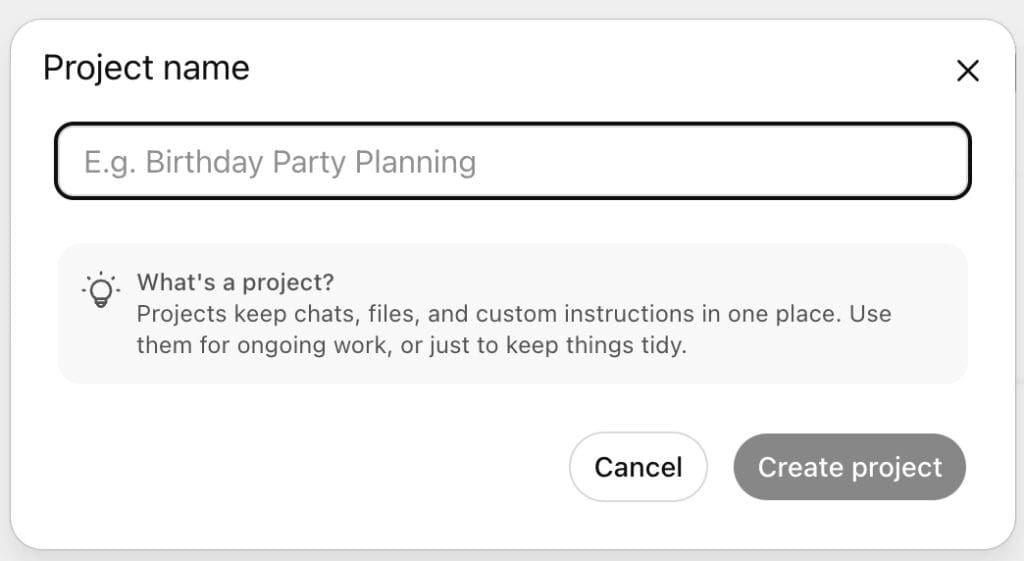
ChatGPT Plus ($20/month) unlocks sophisticated voice control through Projects and Memory features.
Projects configuration for task-based voice consistency
Navigate to: ChatGPT → Projects (in the sidebar, click the “+” icon next to Projects)
Projects are task-based workspaces where you organize related chats, files, and custom instructions for specific topics or formats.
They are available to all paid plans, including Enterprise, and can be created on the web and the Windows app.
Example Project Setup:
- Project Name: “LinkedIn Content Creation”
- Upload Project Files (click “Add files”):
- LinkedIn writing samples and successful posts
- Target audience profile document
- Brand voice guidelines for LinkedIn
- Industry insights and research materials
Project file limitations:
- 20 file limit per project
- 512MB maximum per file
- Text documents capped at 2M tokens per file
- Supported formats: PDF, DOCX, PPTX, XLSX, TXT, JPEG, PNG
Setting up project instructions (click “Add instructions”):
Project instructions are powerful because they supersede your global Custom Instructions and only apply within that specific project context.
Reference uploaded style guide and writing examples for this project. When creating LinkedIn content, follow the uploaded audience profile and successful post examples. Use my analytical tone with engaging hooks, specific insights, and clear value propositions. Structure posts with: strategic opening, personal expertise, actionable takeaway. Always reference uploaded brand guidelines for voice consistency.
File handling instructions (Critical for Projects):
Include specific instructions about how ChatGPT should use your uploaded files:
When writing, always reference the uploaded writing examples first to match my voice patterns. Use the style guide constraints to avoid prohibited words and phrases. Check audience profile document before determining tone and complexity level. If creating proposals, follow the template structure in uploaded proposal examples.
Project-specific behavior guidelines:
Each project can have unique behavioral instructions:
- LinkedIn Project: “Always suggest 3-5 relevant hashtags, write in first person, include a question to drive engagement.”
- Client Proposal Project: “Use formal business tone, include executive summary format, reference specific client research from uploaded files.”
- Internal Report Project: “Use diplomatic language for recommendations, include data-driven conclusions, format with clear section header.s”
This approach ensures ChatGPT adapts its behavior not just for voice, but for each project type’s specific workflow and output requirements. Context matters for AI.
File organization best practices
- Upload 3-5 high-quality examples per project (within the 20 file limit)
- Include one comprehensive style guide per project
- Add audience-specific guidelines when creating multi-audience content
- Name files clearly: “LinkedIn_Voice_Examples.pdf” or “Client_Proposal_Template.docx”
Multiple projects for different contexts
- “Client Proposals” – Upload proposal templates, client research, formal writing samples
- “Internal Reports” – Upload report examples, company guidelines, executive communication samples
- “Email Communications” – Upload compelling email examples, stakeholder profiles, communication frameworks.
When you upload files to a Project, they are available globally and accessible to all chats within that project.
Tip: Instructions set in your Project will supersede custom instructions set in your ChatGPT account and only apply within that project.
Key project benefits:
- Files remain exclusive to each project’s context
- Custom instructions apply only within that project
- All chats within the project can access uploaded files
- Chats in Projects use GPT-4o
- Easy switching between different voice contexts (without losing your mind)
Memory integration strategy
ChatGPT’s memory feature is available to all ChatGPT Plus users and remembers your preferences across conversations:
- Communication style patterns you approve
- Audience definitions and content requirements
- Format specifications that work
- Voice refinements over time
To configure memory: Settings → Personalization → Memory
Enable memory and ChatGPT will automatically learn:
- Which voice adaptations you approve vs. reject
- Content format preferences by type
- Audience-specific language adjustments
- Your editing patterns and preferences
Your Projects will reference your memories, creating an even more sophisticated voice consistency system. (When it works, it’s pretty impressive.)
4. Custom GPT creation for ultimate voice control (Plus Plan)
For the most sophisticated voice consistency, create a dedicated Custom GPT:
Navigate to: Explore GPTs → Create
Create Tab (Conversational Setup): Describe your voice assistant to the GPT Builder:
Create a professional writing assistant that matches my specific voice and adapts to different content formats. It should sound like a confident business strategist who explains complex topics clearly while maintaining authority and accessibility.
Configure Tab (Detailed Settings):
1. Name: “[Your Name] Professional Voice Assistant”
2. Additional Instructions (detailed voice specifications):
Reference uploaded writing samples to match my natural voice patterns. Use confident analytical tone with concrete examples. Write short, punchy paragraphs that start with strategic insights and end with actionable steps. Never use 'dive deep,' 'leverage,' or generic business speak. Adapt complexity for audience while maintaining direct, results-focused approach. Always include specific examples and avoid abstract concepts.
3. Conversation Starters:
- “Create a LinkedIn post about [topic]”
- “Draft a client proposal for [project type]”
- “Write an executive summary for [topic]”
- “Compose a follow-up email for [situation]”
4. Knowledge Files (upload your style documentation):
- Writing Style Guidelines.pdf
- Professional Writing Examples.docx
- Voice Analysis Results.txt
- Brand Voice Constraints.pdf
5. Capabilities: Enable web browsing for current information, Advanced Data Analysis for data-driven content
This creates a specialized voice assistant you can use outside of Projects, with consistent access to your voice patterns and style guidelines across all conversations. (Your personal writing clone, basically.)
5. Format-specific voice adaptation
Professional voice consistency means adapting appropriately, not sounding identical across all formats. A LinkedIn post shouldn’t sound like a legal brief. Obviously.
LinkedIn posts: Professional authority
- Strategic insight opening
- Personal perspective woven through
- Clear value proposition
- Engaging but professional tone
Client proposals: Collaborative confidence
- Problem-solution structure
- Specific deliverables and outcomes
- Partnership-oriented language
- Professional but approachable tone
Internal reports: Strategic clarity
- Executive summary approach
- Data-driven recommendations
- Clear next steps
- Diplomatic directness
Email communications: Efficient professionalism
- Context-aware opening
- Concise information delivery
- Clear action items
- Appropriate relationship tone
6. Voice setup troubleshooting
Let’s be realistic about when voice profiles don’t work and what to do instead. (Because they will fail. Frequently.)
Common failure scenarios:
- Model updates breaking established voice patterns (thanks, OpenAI)
- Creative content requiring unique stylistic approaches
- Highly technical content outside your voice training
- Time-sensitive content needing immediate output
Alternative strategies:
- Prompt library: Save successful prompts for different content types
- Tool switching: Claude often produces a more consistent writing voice (when ChatGPT is having a bad day, and it will.)
- Hybrid approach: AI draft followed by manual voice editing
- Template system: Structured formats with AI content assistance
Realistic expectations: Expect 70-80% voice consistency, not perfection. Some content will always require individual attention, and it should.
In my experience, investment starts to pay off after creating 20+ pieces of content with updated versions for voice examples and style instructions.
For occasional AI users, manual prompting may be more efficient. Test your pain points.
Success metrics to track:
- Reduced editing time per content piece
- Consistent audience feedback on voice authenticity
- Faster content creation without quality compromise
- Decreased prompt iteration requirements
7. Implementation timeline
Day 1: Collect writing samples, complete voice analysis
Day 2: Configure Custom Instructions or Projects, test with 3-5 content pieces
Day 3: Refine setup based on results, document successful configurations
Day 4: Integrate into regular content creation workflow
Monthly admin: Review and adjust voice instructions based on new content needs and AI model updates.
Wow! Thanks a lot for reading (scrolling) this far. Now, implement and experiment! Hit reply for any questions. I’m happy to help.
Mark
The AI Learning Guy
👋⚡😎
The AI Learning Guy newsletter 🤖 🧠💡
AI learning hacks and mega prompts delivered to your inbox.